Windows tray notifier · Azure DevOps & GitHub
Your build broke forty minutes ago.
Congratulations on noticing.
Greenlight sits in your tray and watches your pipelines and pull requests across Azure DevOps and GitHub. Red, amber, green. You glance, you know, you get back to work. No dashboard tab to babysit, no monthly fee for the privilege of being told bad news.
- $0
- Forever
- 2
- Providers
- 4
- Lamp states
- 0
- Browser tabs
Section 01 — Signal codes
Four lamps. Infinite disappointment.
 Green
GreenEverything passes
Nothing needs you. Suspicious. Go get coffee before somebody notices.
 Amber
AmberRunning, or a review is waiting
Someone wants your opinion. You will give it. It will be ignored.
 Red
RedA pipeline is broken
It worked on your machine. Truly one of the great unsolved mysteries.
 Dark
DarkDisconnected, or clueless
Same emotional state as your access token on day 91.
Section 02 — Simulator
Try the lamp. Break nothing.
State 01
All clear
Everything passes
Nothing needs you. Suspicious. Go get coffee before somebody notices.
The real tray icon mirrors this state. The red one is the most common in production.
Section 03 — Sound alerts
Point any status at a .wav and let the office hear it
Every event takes its own .wav file. Ours are chosen with taste and restraint: green gets “Yeah, baby, yeah!”, amber gets “I've got a bad feeling about this”, and red — obviously — gets “Bring out your dead!” Assign one below and press Play.
“Yeah, baby, yeah!”
“Danger is my middle name.”
“Bring out your dead!”
Section 04 — Evidence
The window you'll open twice a day
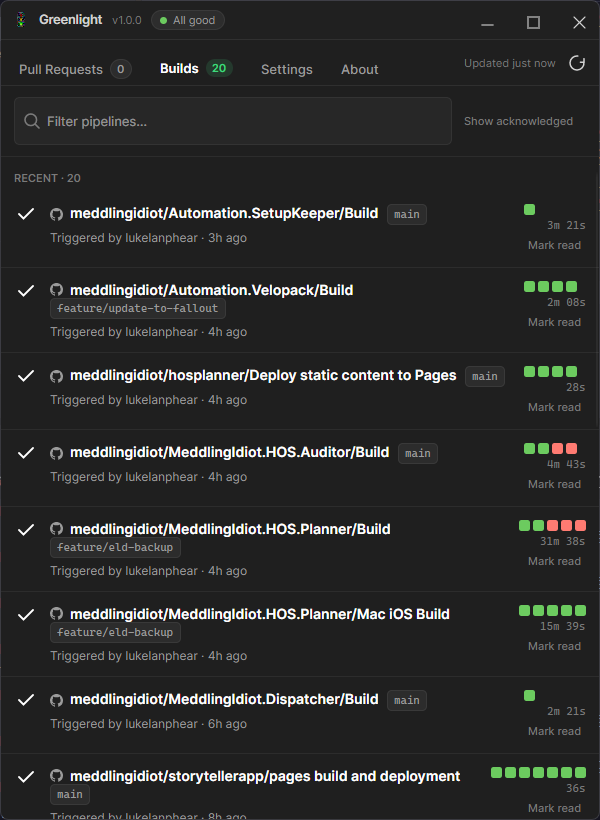
Runs grouped by pipeline, branch chips, durations, and a strip of little squares that tells you how long this has been going wrong. Click one, the browser opens, you sigh.
The Builds tab, honestly captured. Some of those squares are already red.
Section 04 — Spec sheet
What it does, in the driest possible terms
Providers
Azure DevOps + GitHub, one polling loop
Your team never agreed on one. It's fine.
Pull requests
Needs review / approved / changes requested
Filterable, so you can locate the PR you've been dodging.
Builds
Grouped by definition, branch, duration
Includes who triggered it. That field gets read the most.
Tray lamp
Aggregate health across every connection
One pixel now carries your whole release process.
Toasts
Failures, recoveries, review requests
Individually configurable, for people who mute everything.
Tokens
Windows Credential Manager, DPAPI
Not a desktop file called tokens_FINAL.txt.
Access
Read-only against both providers
It never merges, approves, cancels or queues. That's still you.
Telemetry
None
Mostly because writing telemetry sounded like work.
Hardware
Build-indicator plugin contract
Drives a real desk stoplight. Visible from the hallway.
Footprint
Single instance, starts minimised
It does not want a relationship with you.
Section 05 — What it watches
Everything you'd otherwise keep a tab open for
W-01
Pull requests
W-02
Pipeline builds
W-03
GitHub checks
W-04
Tray & toasts
W-05
Secure by design
W-06
A real desk stoplight
The long version, feature by feature, lives on the features sheet.
Section 06 — The hardware bit
A real stoplight on your desk, wired to your build
Greenlight ships a plugin contract for physical build indicators. Implement one small interface, drop the DLL in the plugins folder, and your lamp gets every state change — steady colour for the verdict, flashing while a build runs. The included K8055 plugin drives a three-lamp desk light over a USB board. Your teammates will hate it, which is how you know it works.
- Plugins load in isolation — a lamp that throws takes itself down, not the app.
- A 32-bit bridge process talks to the legacy board driver over stdin.
- Restart a lamp from Settings when its board wanders off.
Coming soon — video course
Hooking up the stoplight, on camera
A short demo series is planned: parts and tools, relays and the K8055 board, the x86 bridge, the plugins folder, and a pipeline broken on purpose so the plastic lamp goes red on film. Mistakes left in, because that is the part you actually need.
No waitlist, no email capture. It will simply appear on the lamp page.
Section 07 — Commissioning sequence
Running in about a minute
- 01
Connect
Paste a Personal Access Token or sign in with Azure AD, then choose the projects, repos and pipelines worth watching.
- 02
Greenlight watches
It polls on a schedule you set, and never writes anything back. Read-only, so the damage stays manual.
- 03
Glance
The lamp stays honest. Click a row to jump to the PR or build. That is the entire user journey.

Section 08 — Your tokens stay yours
Nothing leaves the machine
Storage
Not stored in
Network
Scopes
Section 09 — Testimonials, allegedly
Praise from people who exist
“I used to find out main was broken from a standup. Now I find out from a small red circle, thirty seconds after I cause it.”
“We were about to pay per seat for a cat to tell us the same thing. This was free and it does not purr at me.”
“The desk stoplight has ended two arguments and started five. Net positive.”
Section 10 — Pricing
The whole table
$0
/ forever / per anything
No seats, no trial, no upgrade prompt at the worst possible moment. It watches builds. Charging for that felt rude.
Download for WindowsSection 11 — Anticipated complaints
Questions you were about to ask
Does it fix the build?
No. It reports the failure quickly and in a tasteful enamel red. The fixing part remains, tragically, yours.
Why not pay for CatLight?
You could. You also could have written tests. We are all making choices here.
Mac or Linux?
It's a Windows tray app wired into Credential Manager. This page works on your phone, which is legally almost the same thing.
A physical stoplight, really?
Plugin contract plus a K8055 relay bridge. Nothing communicates healthy team culture like a red lamp nobody will admit to owning.
Is there a course for building it?
Planned. Parts, relays, the 32-bit bridge, plugin folder, and a pipeline broken on purpose for the shot. Details on the lamp page.
Put a light on it.
Free, small, and determined to stay out of your way until the exact moment it shouldn't.
Download the installerv0.0.1 · Windows 10 / 11 x64 · installs per user